
Employee Center, EC Pro, Employee Slate and ServiceNow EmployeeWorks are not four products competing for the same budget line. Sorting out which is which changes the migration conversation before it starts. The question arrives in a dozen forms and they all carry the same mistake. Should we move to EmployeeWorks or stay on Employee Center. Is Slate replacing EC Pro. Do we have to buy EmployeeWorks to get Slate. Is Otto the Moveworks one or the ServiceNow one.
Every one of those assumes a choice between products sitting side by side on a price list. That is not the shape of it. The four names people are using describe two portals, one licensing bundle and, once Otto joins the conversation, one AI layer that is not a portal at all. Until that sorts out, the migration and budget conversations downstream are being had on a false premise.
I spent time in ServiceNow’s Australia release documentation and the practitioner threads behind it. What follows is the sort, then what actually differs between the two portals, then the parts that bite once you know what you are holding.
Four Names, Two Portals
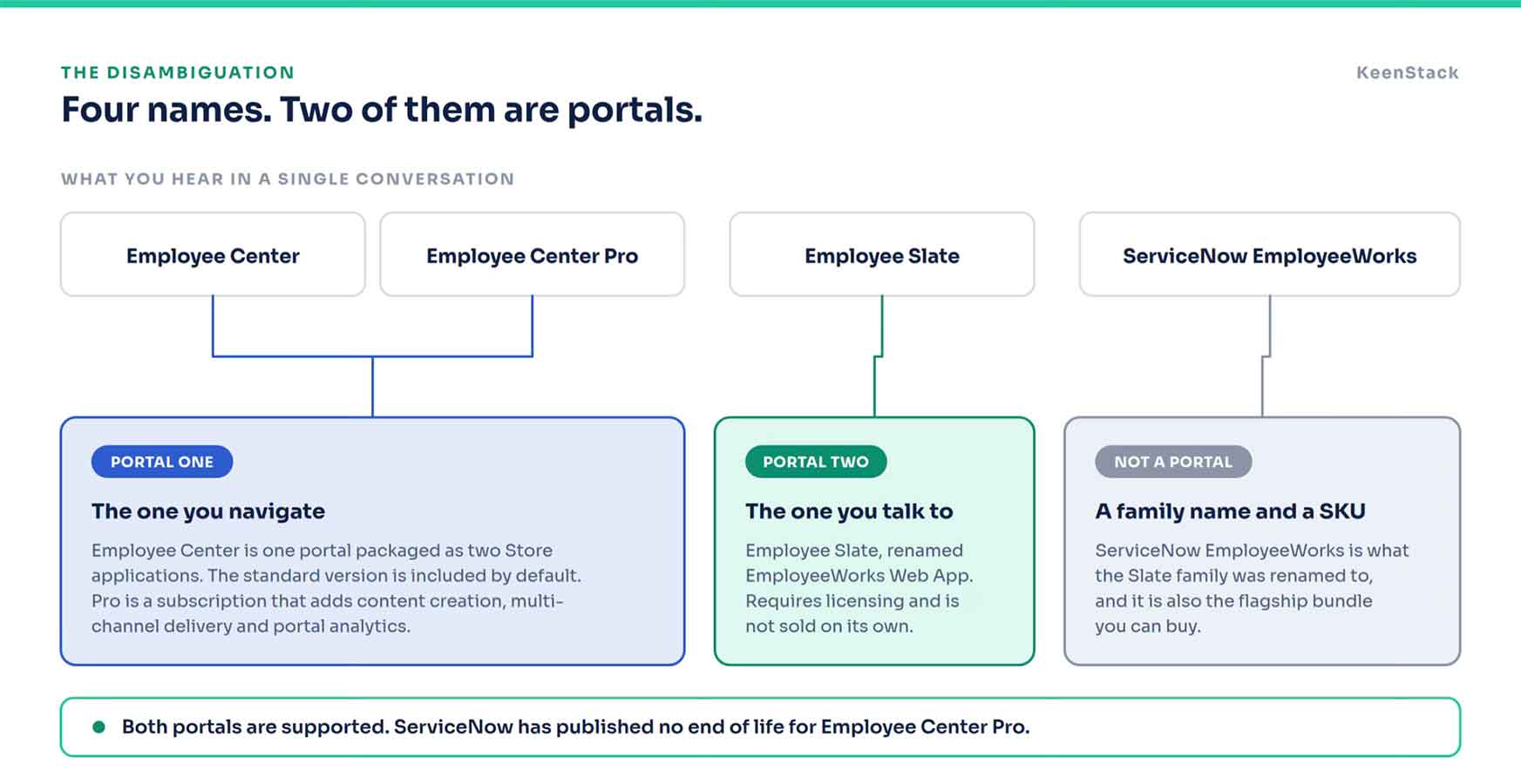
The documentation is unusually direct about the first half of this. Employee Center, in ServiceNow’s own words, is one portal that is packaged as two separate store applications. Not two products. One portal, available at two levels. The standard version is there by default. Employee Center Pro is a subscription on top that adds content creation, multi-stage and multi-channel content delivery, and portal analytics.
Nobody is choosing between Employee Center and Employee Center Pro. They are choosing whether to pay for the upper tier of a portal they already have.
Employee Slate is the genuine second portal. It is an AI-first experience that pulls search, requests, tasks, knowledge and communications into one destination, it needs its own licensing, and it sits inside the same Unified Employee Experience suite as Employee Center rather than replacing it. ServiceNow has published no end of life for Employee Center Pro and states no plans to deprecate it.
That accounts for three of the four names. The fourth is the one causing the most trouble.
What Each One Actually Is
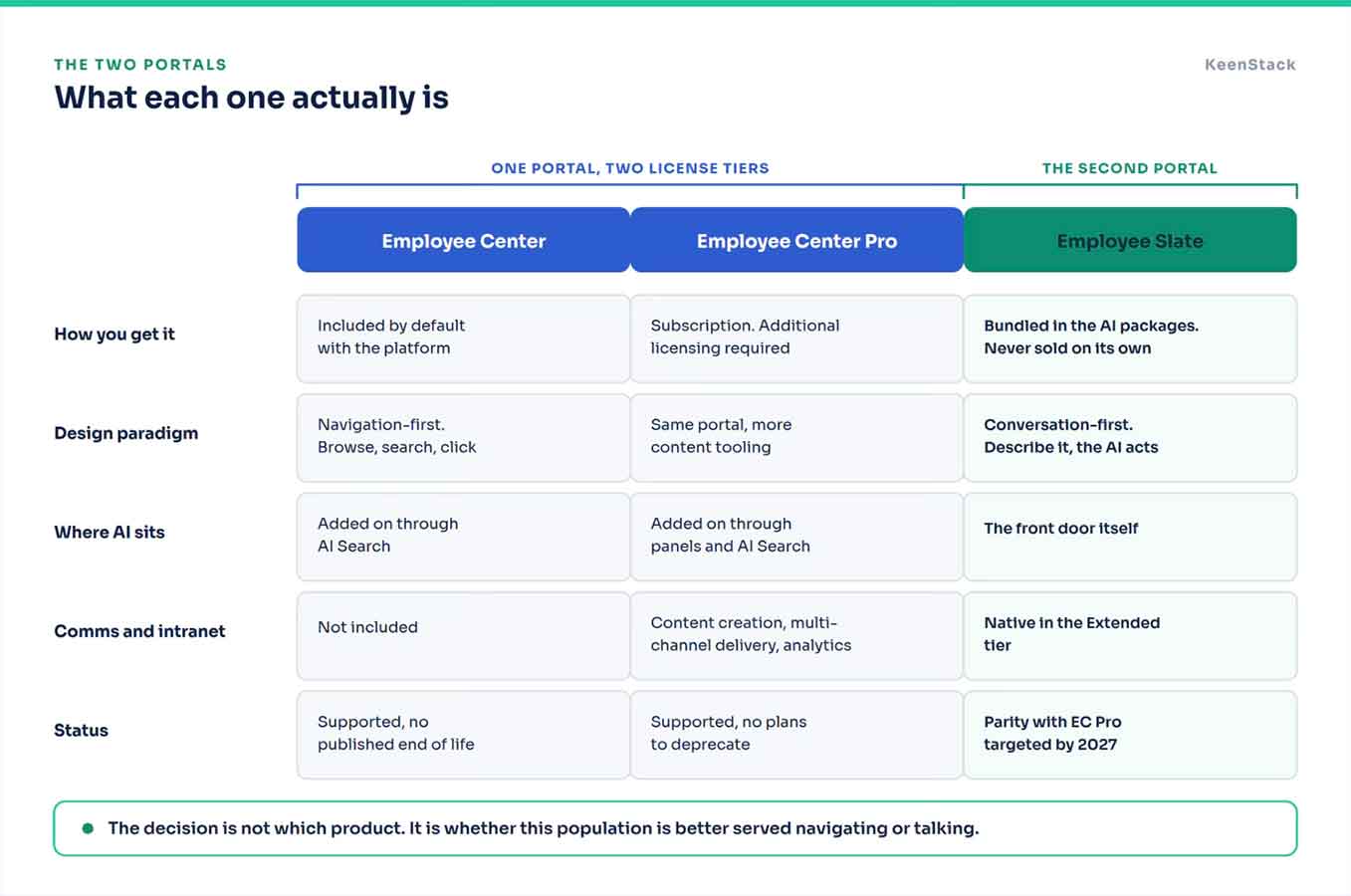
The paradigm split is the part worth dwelling on, because it is the only one that should decide anything. Employee Center is navigation-first. An employee browses, searches and clicks through catalogs and knowledge. Slate is conversation-first. An employee describes the need and the AI opens the form, the answer or the task in a split view beside the chat.
Neither is automatically right. A warehouse population that opens the portal twice a year to change a benefit election is not obviously better served by a chat bar. A corporate population that lives in requests and approvals probably is. That is the real decision, and it is a decision about people rather than about products.
EmployeeWorks is the Word Doing the Damage
ServiceNow EmployeeWorks is not a portal. It is the flagship bundle, the one pairing the top Slate tier with the full Moveworks capability set. Clear enough on its own.
Then, in the last few weeks, ServiceNow rebranded the entire Employee Slate product family to ServiceNow EmployeeWorks and renamed the application itself to EmployeeWorks Web App. Employee Slate Core became EmployeeWorks Web App Base. Employee Slate Advanced became EmployeeWorks Web App Extended.
So one word now names the family, the bundle you can buy, and the application you log into. If you have sat in a meeting where two people used EmployeeWorks to mean different things and neither noticed, that is the mechanism. The documentation and the Store still carry the old names in places, so both vocabularies are live at the same time.
The rule I use out loud. When somebody says EmployeeWorks, ask whether they mean the thing you buy or the thing you log into.
And Otto is not a Portal Either
The fifth name shows up as soon as anyone demos this, and it is wrong in the market more often than it is right.
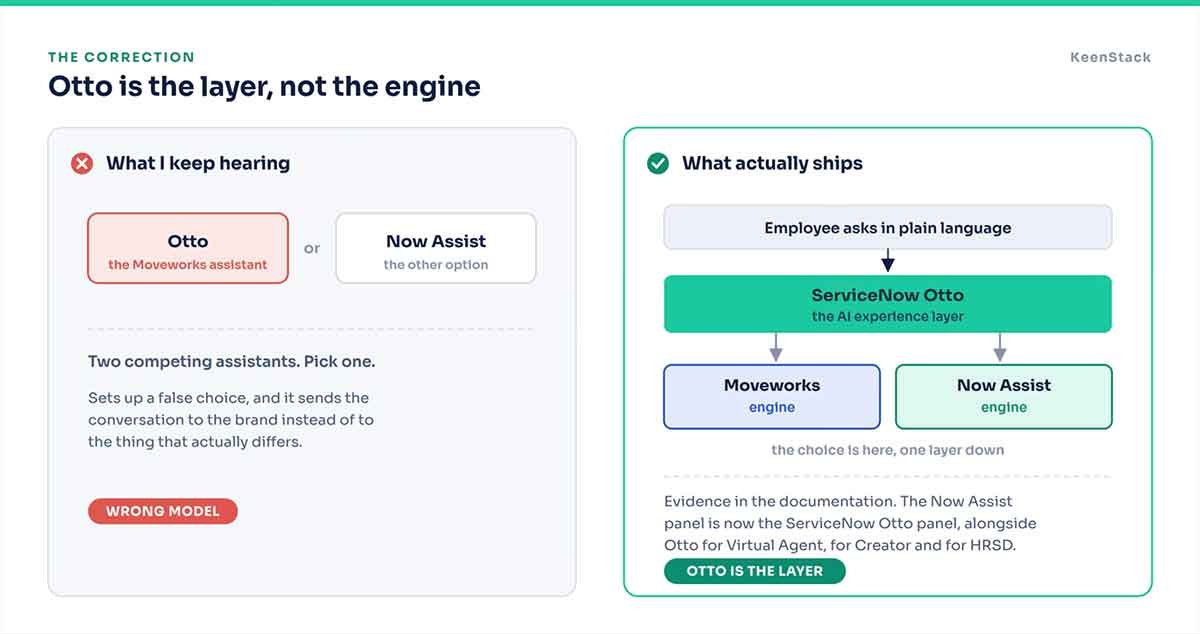
ServiceNow Otto is not the Moveworks assistant. Otto is the assistant brand across the platform now. The documentation renamed the Now Assist panel to the ServiceNow Otto panel. There is ServiceNow Otto for Virtual Agent, for Creator and for HRSD. ServiceNow’s own getting-started material describes Otto as the single AI experience layer in EmployeeWorks, the layer unifying Now Assist and Moveworks underneath it.
So the choice is not Otto or Now Assist. The choice is which engine sits under Otto, and that is one layer further down than most of these conversations are being held.
Which One You Are Actually Paying For
Here is where the naming confusion stops being an annoyance and starts costing money.
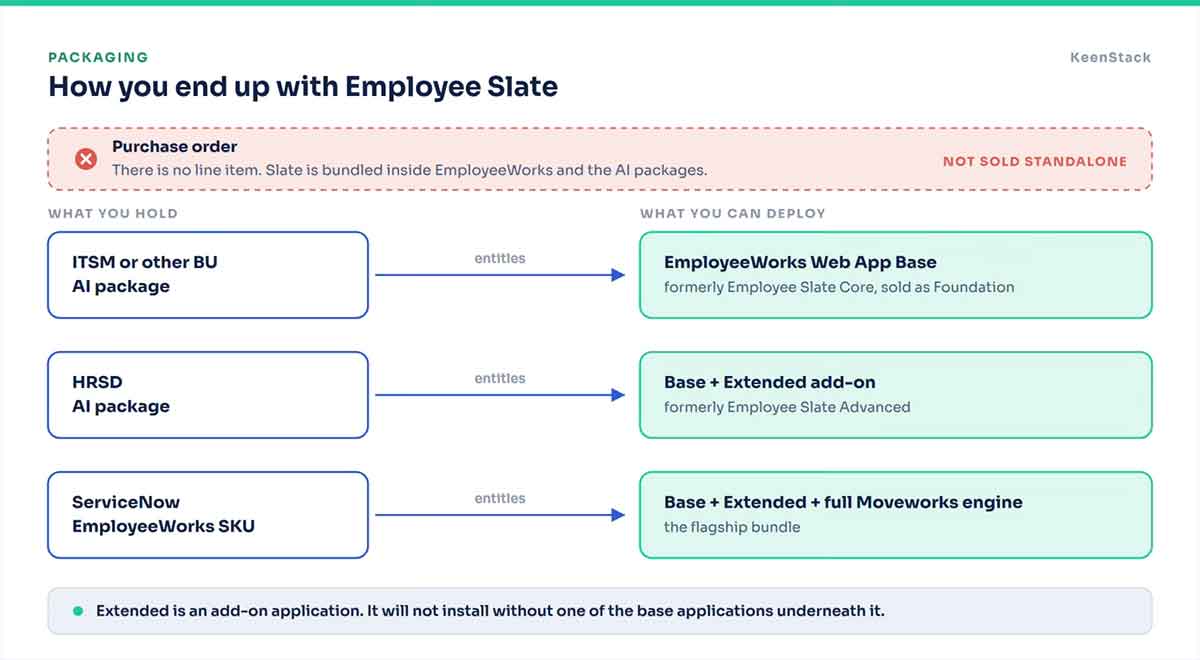
Slate is not a line item. It is bundled inside ServiceNow EmployeeWorks and inside the AI packages, so the tier a client ends up with is set by an AI package decision, usually at renewal, often by someone who was not thinking about the portal at all. An ITSM AI customer holds the base tier today whether they know it or not. An HRSD AI customer holds the upper tier, with activation limited to licensed users where the population is only partly covered.
Which means the honest first question in any of these conversations is not what do you want. It is what did you already buy.
Under Slate, One More Choice
Both engines carry the Slate experience. They do not deliver the same product.
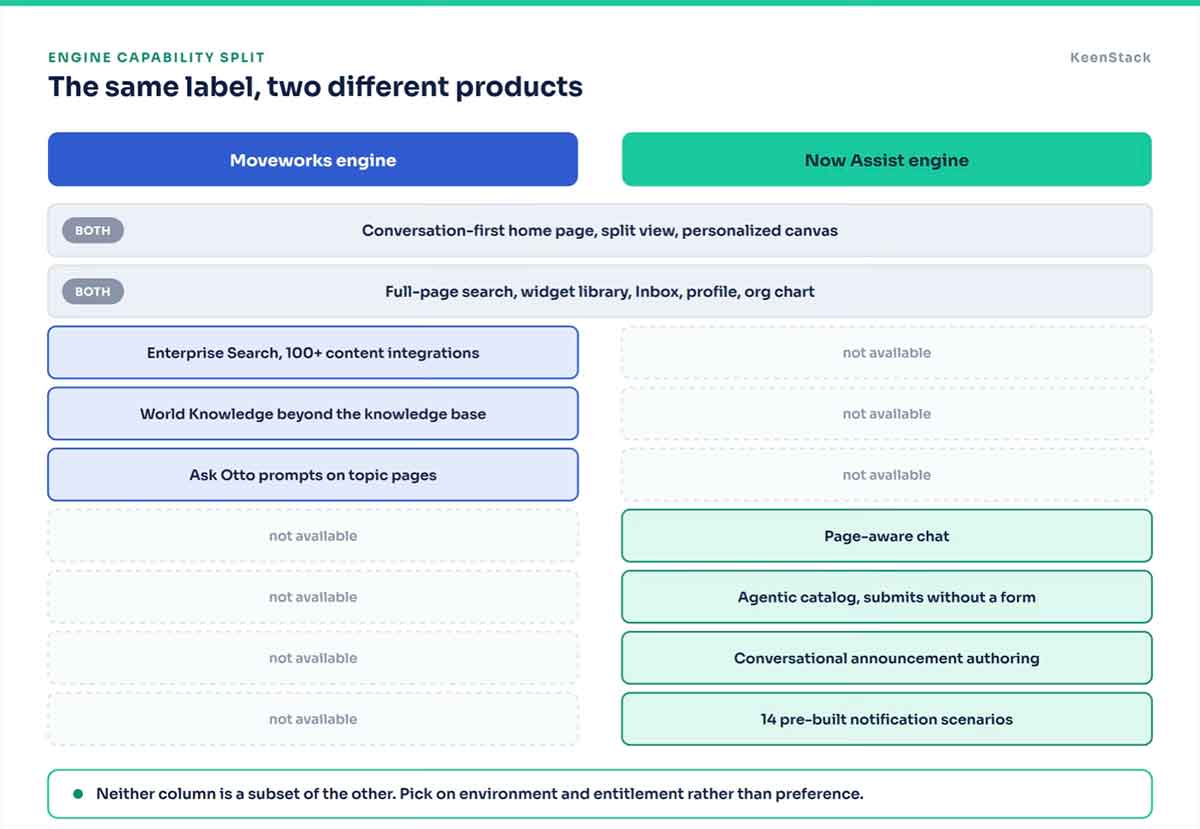
The Moveworks engine brings enterprise search across more than 100 content integrations, reaching SharePoint, OneDrive, Google Drive, Slack and Outlook. It brings World Knowledge, which is governed reasoning for the general questions employees are asking something else anyway. And it brings the Ask Otto prompts on topic pages, which the documentation states plainly are available only on Moveworks experiences.
The Now Assist engine is not a subset of that. It has page-aware chat, an agentic catalog that collects inputs in conversation and submits without a form, conversational authoring for announcements, and 14 pre-built notification scenarios. Pick on environment and entitlement rather than preference.
What You Do Not Get Yet
Slate runs in ServiceNow commercial data centers only today. Regulated and GCC environments, AWS and Azure are described as coming. It is built for the internal employee persona and is not intended for CSM or external user cases. It does not run on a Personal Developer Instance, so plan an evaluation instance or temporary entitlement early rather than the morning you meant to start.
On migration, the inheritance is real but bounded. Unified Inbox, Employee Profile, Org Chart and taxonomy configurations carry over from an existing Employee Center deployment with no migration project. Custom Employee Center widgets do not sit inside that inheritance. Treat each one as a rebuild until you have proven otherwise. The home page layout is fixed, and employee personalization happens on the canvas instead.
The First Failure Is A Naming Rule Nobody Documented
Once you know what you hold and you go to stand it up, this is the detail I would not have found in the product documentation.
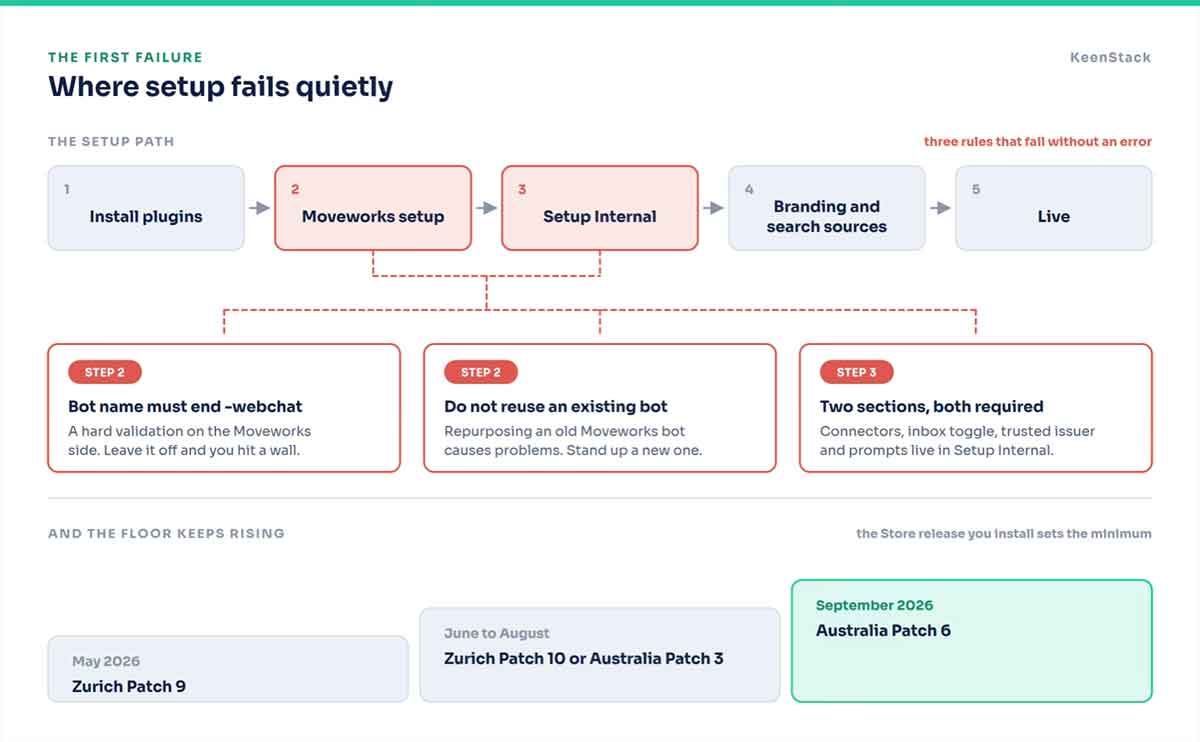
If you deploy the Moveworks engine, the bot name has to follow the format org-name-employeeworks-webchat. The -webchat suffix is a hard validation requirement on the Moveworks side. Leave it off and you hit a wall. A practitioner walkthrough from June puts it in exactly those terms, and it appears nowhere in the ServiceNow product documentation I read.
Two more from the same source. Do not reuse an existing Moveworks bot, because repurposing one causes problems. And the Moveworks setup and the Setup Internal section are two different places. Connector selection, the user inbox toggle, the trusted issuer and the suggested prompts all live under Setup Internal. Finish one, skip the other, and the configuration is incomplete without telling you so.
The platform floor is its own trap, because it moves. The May Store release needed Zurich Patch 9. June through August need Zurich Patch 10 or Australia Patch 3. September needs Australia Patch 6. The floor rises with the Store version you install, which makes “we meet the minimum” a sentence with an expiry date on it.
Every Employee Is A Population You Have Not Metered Before
This is the line item worth forecasting before a pilot rather than after one.
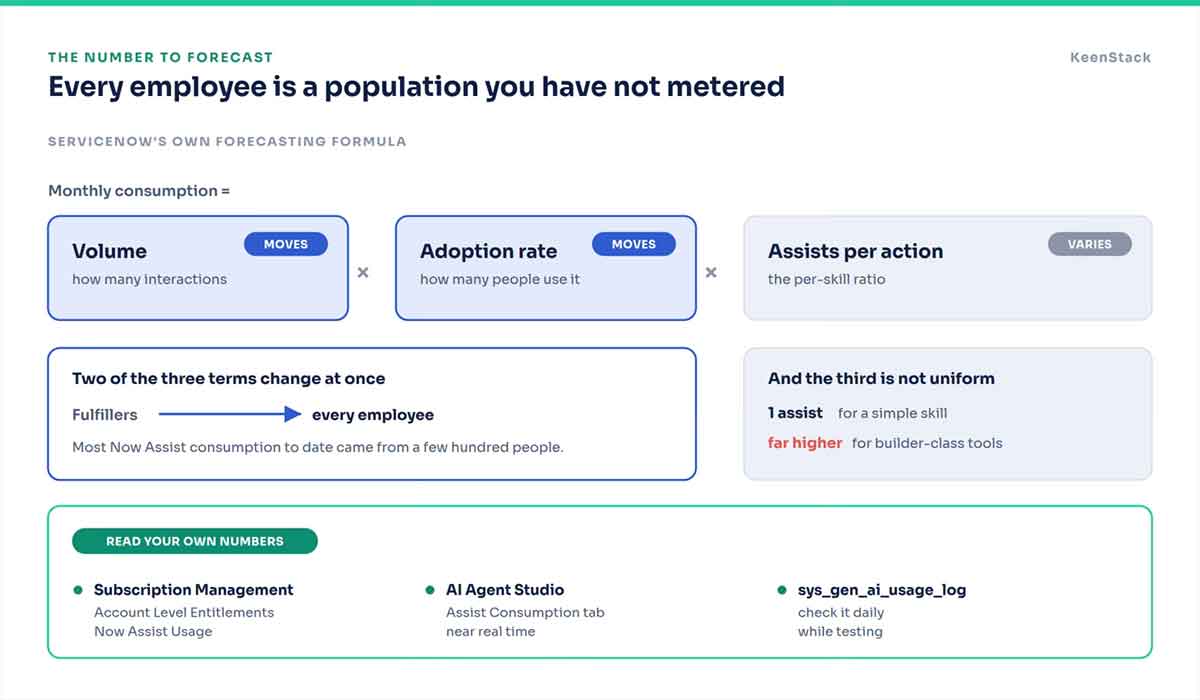
Slate consumes assists, because it is conversation-based. ServiceNow’s own product FAQ says so and names skills that draw on them, including summary generation, approval checklists and text-to-widget creation. The same FAQ also says not every conversational interaction consumes an assist, without saying which ones do. That is the first reason to measure on your own instance rather than model from somebody’s blog post.
Now think about what changes. Most Now Assist consumption to date has come from fulfillers. A few hundred people, maybe a few thousand. Slate puts a conversational front door in front of the entire employee population. ServiceNow’s own forecasting framework runs on volume multiplied by adoption rate multiplied by assists per action. Two of those three terms move by an order of magnitude when the audience becomes everybody.
The third term is worth knowing as well. Assists per action are not uniform. ServiceNow’s framework puts simple skills at one assist and builder-class tools far higher. The AI widget builder is a builder-class tool, and it is the feature everyone wants to try in a demo.
Having sat on the buyer side of platform spend for nine years before this, I would treat this as the number that decides whether year one reads as a win or as a surprise. Read your own rates in Subscription Management under Account Level Entitlements and Now Assist Usage. Watch sys_gen_ai_usage_log daily during testing. Know your contract anniversary date, because the model burns down over 365 days and unused assists do not roll forward.
The One I Would Demo First
I wrote a while back that your AI is only as smart as your CMDB. The employee experience version is that your AI is only as good as your knowledge base and your catalog, and Slate makes that visible faster than any health check deck does.
ServiceNow publishes a knowledge base readiness checklist for this reason. Count published articles and active knowledge bases. Check template consistency. Check whether metadata fields are populated, because that is what lets the AI filter and target. Flag anything untouched for a year, duplicated or close to expiring. The documentation is direct that outdated content degrades both user trust and AI performance.
Run enterprise search against a client’s real content in front of them and the gaps stop being a slide. They are on screen in minutes, in their own material, with their own people watching.
What I Would Actually Do
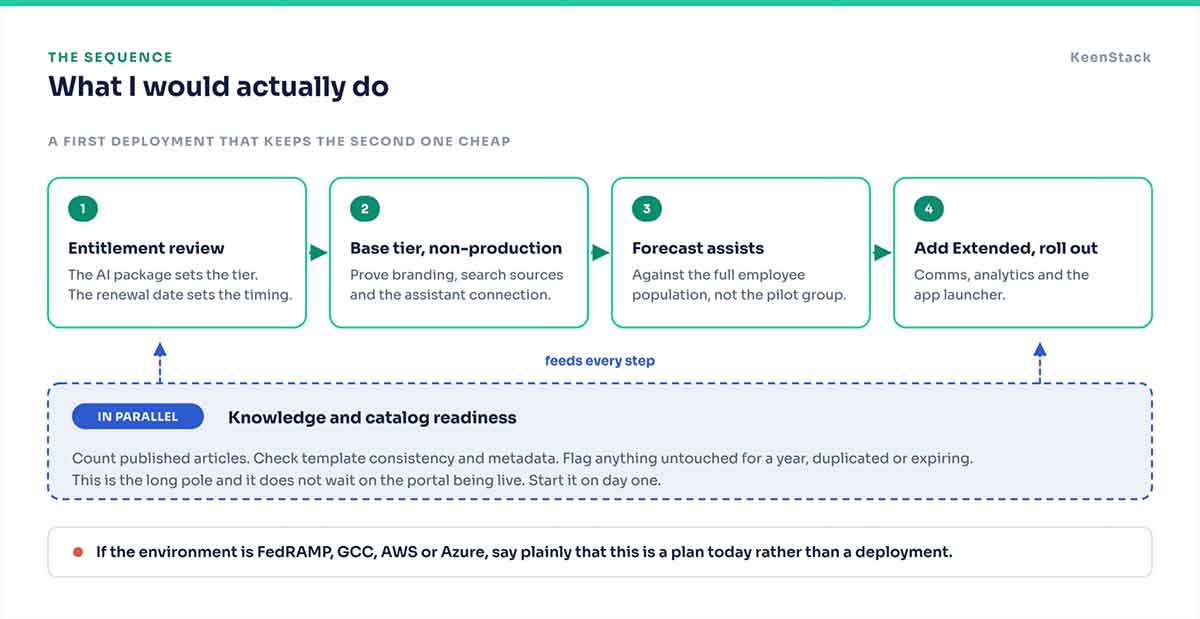
Start with an entitlement review rather than a design session, because the AI package sets the tier and the renewal date sets the timing. Stand the base tier up on a non-production instance and prove branding, search sources and the assistant connection before any add-on capability lands on top. Forecast assists against the full employee population rather than the pilot group. Run the knowledge and catalog readiness pass in parallel, since it is the long pole and it does not wait on the portal being live. And if the environment is FedRAMP, GCC, AWS or Azure, say plainly that this is a plan today rather than a deployment.
One practical caution worth repeating. The month labels on these releases move. The implementation guide gets re-edited as each Store version ships, and features attributed to August in one week’s material had moved to September by the next. Confirm the month with your account team before a client commits a date to it.
None of this is hard once the four names sort out. All of it is confusing while they do not.