
In a well-run portfolio, every project starts as a Demand. In ServiceNow Strategic Portfolio Management (SPM), that Demand is supposed to become a clear portfolio decision: what to fund and how to staff it. In practice, turning a Demand into a staffing plan is often the most manual step in ServiceNow SPM, and that’s where much of the value leaks out.
Ask IT, especially Enterprise Architecture, how good and how consistent the resource estimates on business Ideas and Demands really are. Then ask your project managers and resource managers how much they enjoy building and maintaining resource plans. The answers usually tell the same story. Organizations buy SPM to make better portfolio decisions, but too often it becomes an expensive spreadsheet: a place to record decisions made somewhere else instead of the tool that drives them.
Why Scoping and Resource Planning Break Down
The problem isn’t the platform. It’s the work that has to happen before the platform can help. Every Idea and Demand needs someone to read the business case and attachments, estimate duration and complexity, decide which roles are needed, and figure out when the work could realistically start.
That work is slow, and it depends heavily on who does it. Two architects can scope the same request very differently. Resource plans, or resource assignments in ServiceNow’s newer Resource Management, take real effort to build by hand and even more to keep current. Meanwhile, capacity conflicts often surface after a Demand is approved rather than before. As a result, portfolio decisions get made on estimates nobody fully trusts.
Demand to Staffing Plan, Inside ServiceNow SPM
KeenStack built an AI agent that handles the scoping and resource planning work directly inside ServiceNow SPM. It’s part of a broader shift from AI that suggests to AI that executes the work, and it takes a Demand from a pile of attachments to a staffing plan in four steps. ServiceNow’s own AI for SPM, as of the Brazil release, can summarize a Demand, flag similar ones, or help a requester draft one from a conversation. KeenStack’s agent goes further. It is built for consumption, so teams get a complete, usable draft rather than a summary, it runs more efficiently than the out-of-the-box AI for SPM, and it is extensible: the rules it scopes against can be tuned to how your organization actually works. The walkthrough below shows each step.
Demand to staffing plan, inside ServiceNow SPM.
1. Intake: a new Demand comes in. Requests rarely arrive as tidy forms. A typical Demand shows up with a PDF, an email, a slide deck, and a spreadsheet, and someone has to make sense of all of it before scoping can even start.
2. Read: the agent reads every attachment. The agent works through each attachment and fills in the Idea or Demand record, including the business need, scope, stakeholders, target date, and priority. The result is a complete draft for your team to review, instead of a blank record to build from scratch.
3. Estimate: the agent scopes the work. Next, it estimates duration, complexity, the roles required, allocation, and start week, and it documents the risks and assumptions behind each estimate. In the walkthrough’s example, that comes out to 12 weeks at a complexity of 7 out of 10, with five roles (business analyst, developer, architect, QA analyst, and project manager), 3.5 FTE starting in week 44, and six risks and assumptions to review.
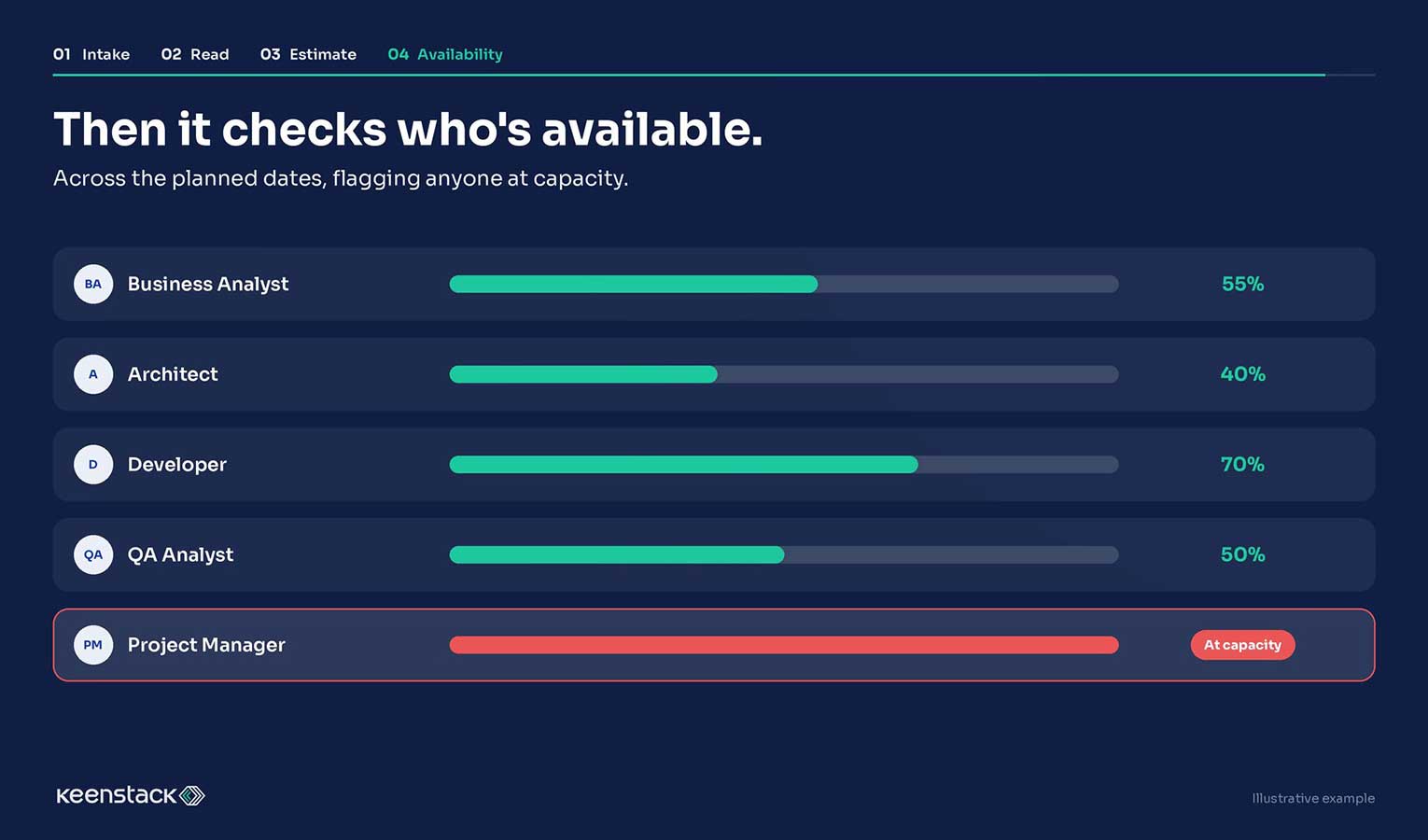
4. Availability: the agent checks who’s free. Finally, it checks each role’s availability across the planned dates and flags anyone already at capacity. In the example, the business analyst, architect, developer, and QA analyst all have room, but the project manager is flagged at capacity. That’s exactly the kind of conflict that usually surfaces only after a Demand is approved. Here, the estimate and the staffing reality arrive together.
Built Around How Each Team Actually Staffs Work
Generic estimates are part of the problem, so the agent doesn’t use them. Instead, its role rules come from each team’s own knowledge base. An infrastructure project and a cybersecurity project get staffed differently, because those teams staff work differently in real life.
This is also why the agent’s output is consistent. The same type of request gets scoped against the same rules every time, no matter who submitted it or who would have scoped it by hand. It’s a practical example of a broader point about AI readiness: AI delivers the most value when it’s grounded in the knowledge your teams already have.
Proven in Production
This isn’t a concept or a lab demo. The agent is already running in production at one of KeenStack’s healthcare clients, where it has been tested against real Ideas, real Demands, and real resource constraints.
For PMOs, the shift is simple. Instead of starting every request from a blank record, teams start from a complete draft that already reflects the work, the roles, and who is free to do it. That gives Enterprise Architecture consistent estimates, gives resource managers time back, and gives portfolio leaders something SPM was always supposed to provide: a reliable basis for deciding what to fund.
Making ServiceNow SPM the Decision Tool It Was Meant to Be
SPM earns its investment when it shapes portfolio decisions, not when it stores them. Automating the scoping and resource planning work removes the biggest obstacle between the two. When estimates are consistent and capacity is visible up front, the conversation moves from “Can we even staff this?” to “Is this the right work to fund?” That’s what SPM looks like when it gets from Demand to staffing plan without the manual work in between
Even before automating anything, PMO leaders can test where their own process stands with three questions. How long does it take to get from a new Demand to a staffing decision? Would two people scope the same Demand the same way? And how often does a capacity conflict surface only after approval? If the answers are “weeks,” “no,” and “often,” scoping is where your SPM investment is losing value.
Is your PMO still scoping Demands by hand? Get in touch with KeenStack and we’ll walk you through the agent end to end.
Frequently Asked Questions
What does KeenStack's SPM agent do?
It takes a new Idea or Demand in ServiceNow SPM from attachments to a staffing plan. The agent reads every attachment, fills in the record, estimates duration, complexity, roles, allocation, and start week with the risks and assumptions behind them, and checks who is available across the planned dates.
Does the SPM agent replace project or resource managers?
No. The agent produces a complete draft for the team to review, so people spend their time on review and decisions instead of data entry.
Where do the agent's staffing rules come from?
Role rules come from each team’s own knowledge base, so an infrastructure project and a cybersecurity project are staffed differently.
Is the SPM agent used in production?
Yes. The agent is running in production at a KeenStack healthcare client.