
A ServiceNow fulfiller license belongs to the people who assign, update, or close records. Everyone who only approves and reads belongs on a Business Stakeholder seat, which, across the ITSM contracts KeenStack has reviewed, has priced at roughly a fifth to a quarter of a fulfiller seat on the same paper.
Most estates have never checked. A manager approves a laptop request and nobody thinks twice. Then the ITSM renewal lands, and 400 managers are sitting on fulfiller seats because someone gave them the agent role so they could open the ticket they were approving.
This is the first article in a series on ServiceNow licensable roles. It stays on ITSM, and every number in it is one you can reproduce on your own instance in an afternoon.
How the Numbers Work
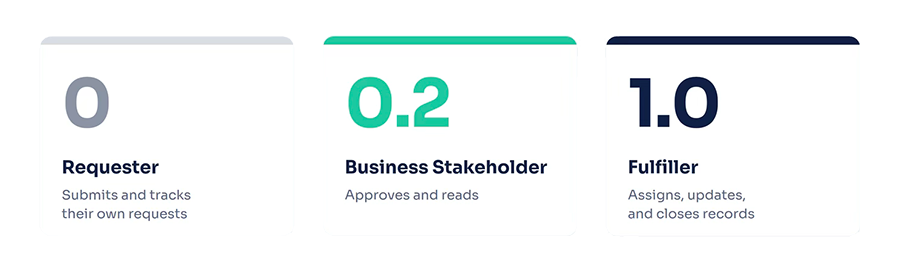
ServiceNow prices each contract individually, so everything below is normalized. A Fulfiller is 1.0, a Business Stakeholder is 0.2, and a Requester is 0. The 0.2 comes from the contracts KeenStack has reviewed, and while rates vary, the ratio holds, which is why this article runs on it. Savings are shown as fulfiller equivalents and as a percent of ITSM seat spend. Plug in your own contract rate and the dollars fall out.
In April 2026, ServiceNow replaced its legacy ITSM tiers with Foundation, Advanced, and Prime, and fulfillers are still licensed per tier.
The Seat Follows the Work, Not the Title
In ServiceNow, the seat follows the work. A director who approves two requests a month and a service desk analyst who closes forty incidents a day can end up on the same fulfiller seat. As a result, many companies pay a full ServiceNow fulfiller license for people who never work a ticket.
ServiceNow’s user types are simple. A Requester submits and tracks their own requests and needs no subscription, but cannot approve. A Business Stakeholder can do everything a Requester does, plus approve requests and view records and reports. In ITSM, ServiceNow’s documentation describes the Business Stakeholder role as letting users view and approve records within all ITSM products. A Fulfiller is anyone who goes beyond that and works the records.
ServiceNow built the Business Stakeholder seat for exactly this group. So the question is never whether a manager who approves needs a seat. It’s which seat, and the answer is the smaller one unless they do something else.
The Activity Test: Who Needs a ServiceNow Fulfiller License?
Forget job titles. Instead, list what each person actually does in the platform, then find the cheapest seat that covers everything on the list. ServiceNow’s own Subscription Management follows the same logic: when it assigns subscriptions automatically, it gives each user the lowest-cost subscription that meets the access needs of their roles.
The line to remember sits between reading and writing. Reading records, viewing reports, approving, and commenting on the approval are Business Stakeholder work. The first write to a task table, such as an assignment, a work note, or a priority change, is fulfiller work. Custom roles follow the same rule. ServiceNow classifies custom and customized roles consistently, by the table access their ACLs grant, so a role that can write to incident or request is a fulfiller role no matter what it’s called. That makes role design on your own instance the thing to watch: one well-meant ACL can move 150 people from 0.2 to 1.0 without anyone on your team deciding to spend the money.
Four Places ITSM Seats Leak
The same four patterns show up in almost every ITSM estate KeenStack reviews. The numbers below assume a 650-seat estate and the 0.2 ratio, so scale them to your own.
Managers given the agent role to see what they approve: This is the big one. Managers couldn’t open the request behind an approval, so someone granted them the agent role. At 300 managers, that’s 1.0 instead of 0.2 each, or 240 fulfiller equivalents, more than a third of the estate, for people who never touch a ticket. To find them, report on agent role holders who have never been assigned a task.
Comment rights granted through a custom role or ACL: A role built so executives can leave notes on incidents writes to the task table, so Subscription Management classifies every holder as a fulfiller. At 150 people and 0.8 extra each, that’s 120 fulfiller equivalents. To find it, list custom roles and ACLs with write access on task tables, then check who holds them.
The approver role on a large group: The approver role gets dropped on an all-managers group of 1,200 because it’s easier than maintaining a list, but only 180 of them ever approve anything. The other 1,020 carry a 0.2 seat for nothing, or 204 fulfiller equivalents. To find it, join group-inherited role assignments to approval history.
Stale roles after transfers and rehires: People move off the service desk and keep the agent role. If that’s 8 percent of a 650-seat estate, it’s 52 seats. To find them, list agent role holders who haven’t updated a task in 365 days. Subscription Management counts active role holders who have logged in within the last 365 days, so an idle role on a user who still logs in still costs a seat.
The four patterns overlap, so audit before you add them up. In practice, the first one alone usually pays for the review.
A Worked Example
Take a 5,000-employee company with 650 ITSM fulfiller seats. Run the activity test, and 400 of those people assign, update, and close records. The other 250 are managers, approvers, and executives who read dashboards and approve requests. They hold the agent role because that’s how they were set up, not because of anything they do.
Before, the company pays for 650 fulfiller equivalents. After moving the 250 to Business Stakeholder, it pays for 400 plus 50, or 450. That’s 200 fulfiller equivalents off the bill, about 31 percent of ITSM seat spend, and nobody loses a capability they use. If your Business Stakeholder rate is closer to a quarter of a fulfiller, the saving is 29 percent instead of 31. Either way, the conclusion holds.
The math scales, too. A 20,000-employee company with the same proportions carries 2,600 seats, moves 1,000 of them, and saves 800 fulfiller equivalents. That’s why the first thing to measure on any estate is simply what share of fulfiller seats belong to people who never write to a task.
Why “No Seat” Isn’t the Answer
Some teams read all this and conclude the answer is no seat at all. Certain approval channels, such as responding to an approval email, can work for a user with no role, so the idea is tempting. However, whether those approvals are licensed is a separate question, and by default the answer is no. Coverage depends on your order form, not your instance. If you want role-less approvals covered, get that sentence on the paper.
There’s a usability cost as well. By default, Employee Center shows catalog request approvals only to users who hold the approver role or Business Stakeholder. A manager with no seat gets the email but can’t find the request in the portal, so someone grants the agent role to stop the complaints, and the first leak starts again. The fix is the right seat plus clear language on the order form, not no seat.
What to Do Before Your ITSM Renewal
Start with the Subscription Management report, which ServiceNow provides so admins can monitor subscription usage on their own instance. Working from that count beats working from a spreadsheet. Next, list agent role holders with no task assignment or update in the last 365 days; that’s your candidate list. Then list roles granted through groups and join them to approval history, because everyone in a group who never approved is a seat to remove.
After that, replace the agent role on approvers with Business Stakeholder, and strip any custom role or ACL that writes to a task table from people who only comment. Finally, take your before and after counts to your ServiceNow account team before the order form is cut, and ask for the Business Stakeholder line on the new paper.
The whole exercise is a few reports and a role cleanup. The hard part is agreeing internally that a title doesn’t earn a seat.
Make Seat Hygiene a Quarterly Habit
Seat hygiene is a quarterly job, not a renewal event. Roles drift every time someone transfers, every time an admin fixes a complaint with the agent role, and every time a new group gets a role for convenience. Run the activity test every quarter as part of ongoing ServiceNow optimization, and the renewal conversation with your ServiceNow account team becomes a straightforward confirmation.
Licensing costs are often the result of implementation decisions nobody meant to make, a theme KeenStack explored in its ITOM licensing series. ITSM seats work the same way. As a ServiceNow reseller partner, KeenStack runs this review as part of its licensing work. The next article in this series looks at products where Business Stakeholder does not apply, including Contract Management, Field Service, HR, and IRM.
Frequently Asked Questions
Who needs a ServiceNow fulfiller license?
Users who work records: anyone who assigns, updates, or closes tasks, or holds a role that writes to task tables such as incident or request. In ITSM, users who only approve, read records, and view reports fit a Business Stakeholder seat instead.
Does a manager who approves requests need a fulfiller license?
It’s a seat for users who approve requests and view records and reports. In ITSM, ServiceNow’s documentation describes the Business Stakeholder role as letting users view and approve records within all ITSM products. In the contracts KeenStack has reviewed, it has priced at roughly a fifth to a quarter of a fulfiller seat.
Where do the agent's staffing rules come from?
Not for approving alone. Approving is Business Stakeholder work. A manager needs a fulfiller seat only if they also write to task records, for example by assigning, updating, or closing them.
How does ServiceNow count fulfiller seats?
Subscription Management counts active users with fulfiller roles who have logged in within the last 365 days.
Want a second set of eyes on your role mix before the order form arrives? Get in touch with KeenStack and we’ll run the activity test with you.